Managed Datasets
Managed datasets are part of the enterprise edition. A community build registers no provider for them, serves none of their endpoints, and renders no record editor, so nothing on this page is reachable on one.
Every other dataset in the catalog got there by being captured: a scheduled query ran, and its results accumulated in the warehouse. A managed dataset is the opposite. Nobody feeds it. Somebody declares its shape, and then people type records into it through the product.
The use for it is the reference data that never arrives on a wire. Which stops have restrooms, which cameras are known to be miscalibrated, which incidents were manually reclassified. That data usually lives in a spreadsheet nobody can join against, and this puts it in the warehouse beside everything else, where a query can reach it.
In the catalog a managed dataset carries the origin contributed and is marked Managed in the list. Where a dataset comes from covers how its page differs from a capture's.
Who can do what
Three levels, and they are checked on the server rather than in the interface:
| Can | |
|---|---|
| Any signed-in member | Read the declaration, the records, and any record's revision history |
| A member of a writer group | Add records as that group, and edit or retract the records that group owns |
| An administrator | Declare a dataset, change or delete one, and set which groups may write |
A writer acts as a group, not as themselves. Editing and retracting are limited to records whose own group is one you belong to and one the dataset still allows, so an admin who removes a group from the dataset closes editing on that group's existing records too, not only new ones.
Declaring one
Admin → Managed Datasets lists every declaration on the instance with its provisioning state, and is where new ones are declared.
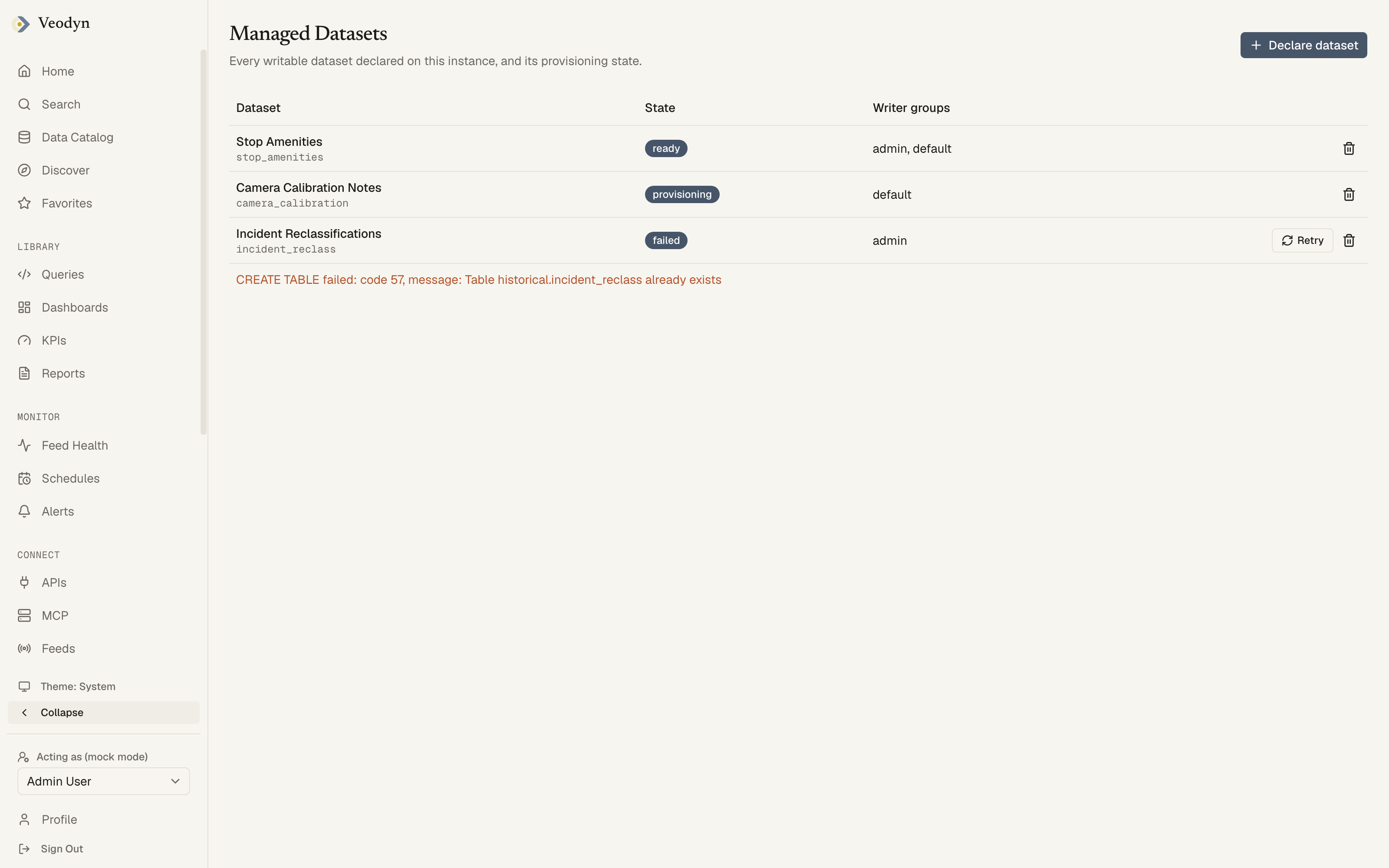 You can also declare one from the catalog page of an existing dataset, which carries that dataset's shape over as a starting point; every prefilled value stays editable.
A declaration is a name, an optional description, the groups allowed to write, and a list of columns.
The id is derived, not typed
The dataset's id becomes an unquoted ClickHouse table name, so it has to be a valid identifier. Rather than asking an admin to type one and then refusing it, the form derives the id from the name: lowercased, with anything outside a-z0-9_ replaced by an underscore, and a prefix added if the result would start with a digit. A hyphen is the natural thing to write in a name and exactly what the identifier rule forbids, so this removes a refusal that was nobody's fault.
The rule matches how captured columns are already named from query results, so a declared name and a captured one follow one rule rather than two that drift apart.
If the id collides with a declaration that already exists, the server answers 409 and the form reports it against the name. It will not quietly add a suffix and hand you an id you never chose.
Columns
Each column has a name, a label shown in the table and the form, and one of seven types:
string, integer, float, boolean, date, timestamp, enum
A column cannot be named after one the record log or the underlying view already defines, and the declaration and its columns are written in a single transaction, so a rejected declaration leaves nothing half created.
Provisioning
Declaring a dataset creates real warehouse objects, so a declaration has a state rather than existing immediately. The console shows that state (ready, provisioning, failed), prints the warehouse's own error on a failure, and offers a Retry on that row alone.
Writer groups are shown and chosen by name rather than by the group ids the declaration actually stores, so the column reads admin, default rather than a pair of numbers.
Delete is offered on every row, and the server refuses it for a declaration that has records. Empty ones delete.
Records
On a contributed dataset's catalog page, a Records section sits below the header.
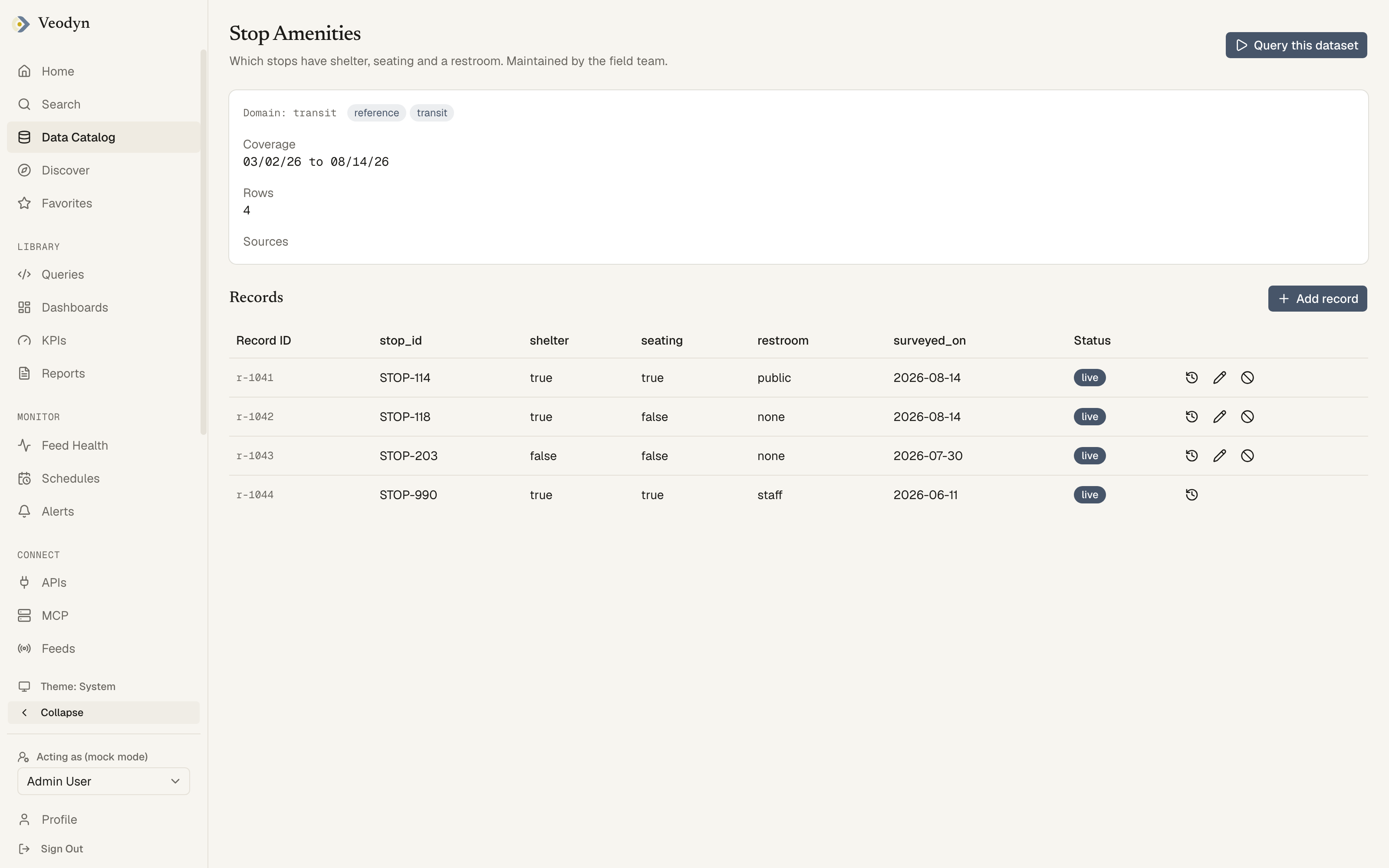
The screenshot is worth reading for the last row. It was contributed by a group this viewer does not belong to, so it offers history and nothing else, while the three rows above it carry edit and retract as well.
It has its own heading for a reason worth knowing if you go looking for it: the section used to render with none, which left an empty dataset showing a lone Add record button under a schema table with nothing saying what it would add a record to. The editor was reported as unfindable, and it was.
The table
One column per field the fetched records carry, labelled and ordered by the declaration rather than by whatever order the values happen to arrive in.
Paging is a cursor, and Next page replaces the page on screen rather than growing an ever longer list. The current page stays visible while the next one loads instead of flashing an empty table.
A captured dataset renders no Records section at all. It has no declaration to read, so the requests are never sent rather than sent and 404ed.
Adding and editing
Add record opens a form generated from the declared columns, with each input typed to its column. It appears only when you belong to at least one group that may write to this dataset. Edit and retract icons appear per row, on the rows whose group you can write as.
Validation is per field. A value the declared ClickHouse type cannot hold is refused with the message placed against the input that caused it, not swept into one banner at the top of the form.
If the declaration read fails, Add, edit and retract are unavailable, and the panel says so. It does not leave the controls sitting there quietly inert.
Retracting, and the history
Records are an append-only log, so nothing here overwrites or deletes.
Retract appends a new revision at status retracted and drops the record out of the table. Its history is kept, and a writer can add a new record with the same values later. It is not an undo, and it does not undo itself.
Every record carries its revision history, readable by any signed-in member, showing what each revision changed. An edit that would land on top of a revision the server has already moved past is refused with the current head returned, so the client can rebase rather than silently clobber someone else's edit.
Reaching the data from a query
A managed dataset is a warehouse table like any other. Once provisioned it appears in the catalog, carries a schema, and can be queried, joined and put on a dashboard exactly as a captured dataset can. That is the whole point of it living here rather than in a spreadsheet.