Prove your captures are current
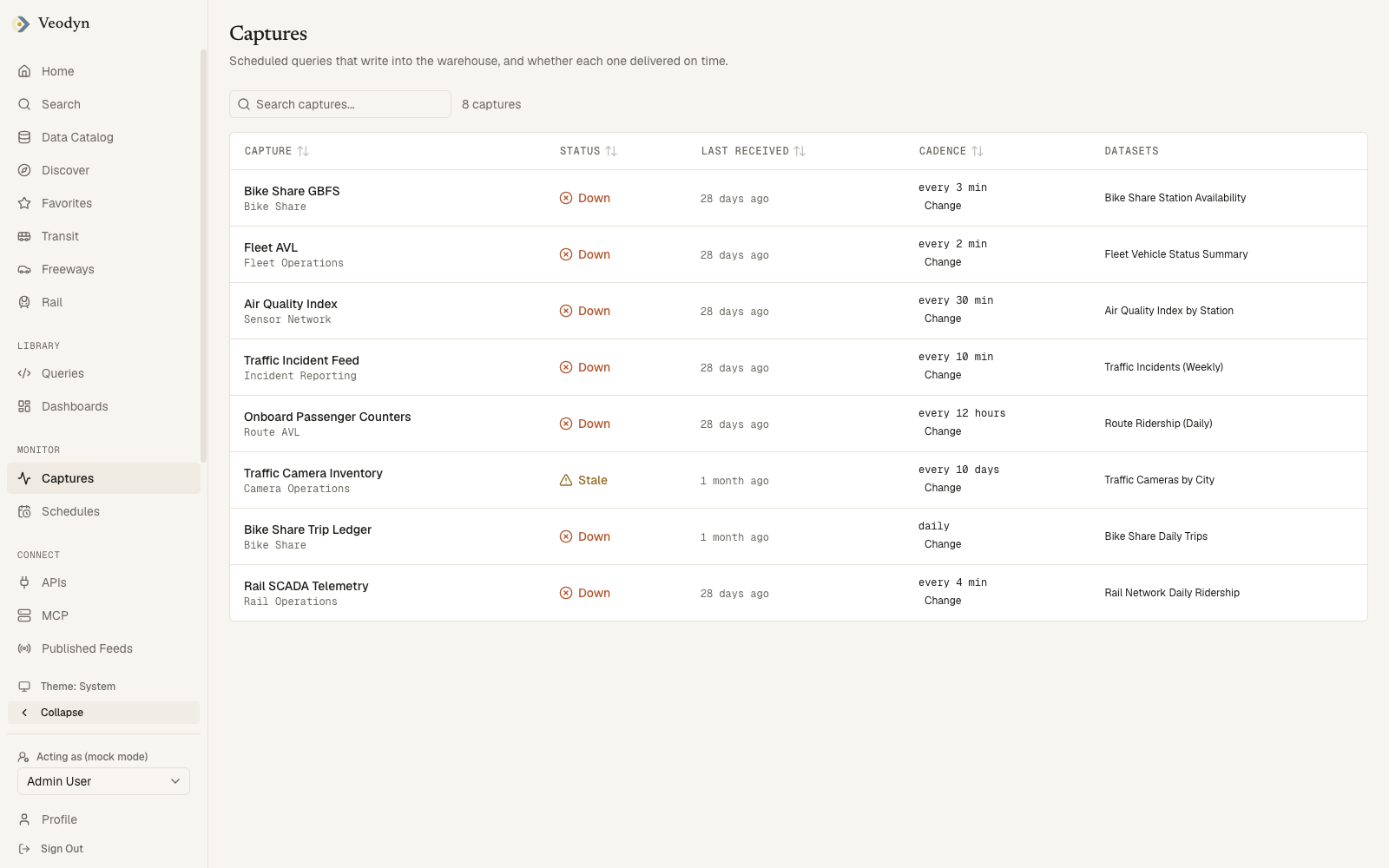
Most dashboards are downstream of a handful of captures, and the recurring question about any of them is whether the number is current or whether the source stopped delivering days ago. The Captures board answers that without opening a query.
A capture is a saved query that writes its results into the historical warehouse. Build a history you can trend covers creating one; this page covers reading the board of them afterwards.
What has to be true
The product can only call a capture late if it knows how often data is expected. Without a declared cadence it falls back to the catalog's blanket freshness check, so a green status there is one cutoff applied to every dataset and says nothing about this capture in particular.
The work is small and mostly one-time: declare a cadence for every capture that matters.
Before you start
You need an account, and nothing else. Setting a cadence expectation is open to any signed-in member, because it changes neither what data is exposed nor who can reach it. Publishing a feed changes both, which is why that one is admin-only.
The steps
1. Read the line under the status
Open Monitor → Captures (/captures). Every row carries a status, and the
page tells you how that status was reached.
| What you see | What it means |
|---|---|
| A status marked Derived, with the Cadence column showing an interval | The product compared last-received against a cadence it knows. This is a verdict |
| A status marked as reported, with None declared, so age is not checked in the Cadence column | The catalog's blanket stale-after window, with no per-capture multiplier. Nothing specific to this capture has been checked |
A derived status has two possible cadences behind it, and the column says which: an expectation someone declared, marked expected, or failing that the capture query's own refresh schedule. With neither, the row falls back to as reported.
The rule is: Stale once the last arrival is past twice the cadence, Down past ten times it, and never better than the verdict the catalog already reached. A capture the catalog already calls stale shows Stale straight away, whatever the multiple would have said.
2. Declare a cadence on every capture you would act on
The Cadence column carries the control. Set the interval to what the source actually delivers. An interval tighter than reality leaves the board permanently red and people stop reading it. Keep the multiples in mind as well: a cadence of five minutes reads Stale at ten and Down at fifty.
Work down the list in the order the rows matter to you. A capture with nothing depending on it can stay undeclared; it will keep showing as reported.
3. Know what breaks when one goes silent
The Datasets column names the catalog datasets each capture populates, each one a link. Those are the tables that stop moving when the capture goes silent.
On an enterprise build there is a Metrics affected column beside it, tracing those datasets on to the KPIs computed from them. A community build registers no metrics feature, so the column is not rendered at all rather than reading None on every row.
4. Check the schedules, not just the captures
Data can be arriving on time while the query that reads it has stopped running,
so check Monitor → Schedules (/schedules) as well. It lists every query
with a refresh interval set, how often it runs, and whether it is keeping up:
On time, Late or Expired. An expired schedule stays on the list marked
Expired instead of dropping off it.
The two pages overlap, and neither is a subset of the other. Captures keeps a dataset it has captured before, whatever its query's schedule looks like now, so a capture whose query lost its interval stays on Captures and disappears from Schedules. A scheduled query that writes nowhere in the warehouse appears on Schedules and never on Captures.
Last result on Schedules means when the rows were last fetched, not when the query was last edited. It is the same field, with the same wording, on the query's own page.
The list reads up to 2,000 queries across 20 pages of 100. Past that, a line above the table says so, so on an instance that large the query you are looking for may not be on the list at all.
Archiving deletes every alert on the query, clears its refresh schedule, and deletes every dashboard widget built on its visualizations. Restore brings back only the query. A restored query looks intact but has no refresh schedule, so it is no longer running.
5. Tie it to what you publish
If you publish a feed of your own, there is
a second freshness question. Under block, a published feed goes on serving its
last good artifact indefinitely, so a dead upstream is invisible at the
published address. Under last known good the address stops answering once the
artifact passes its cap. The consumer sees that; you do not get told.
Captures does not necessarily show it either. Publishing reads the bound query's newest cached result and writes nothing to the warehouse, while this board lists warehouse datasets. So a published feed's source query appears here only if its data source has capture switched on and has captured at least once. Otherwise the two surfaces that answer are Schedules, which says whether the bound query is still running to its interval, and the feed's own publish history, where a stalled upstream shows up as a run that produced nothing new.
To get a published feed onto this board, switch capture on for the bound query's data source.
Private feeds tell the consumer even less. A token that has been revoked or has expired gets the same 404 an unknown slug gets, not a 503, so from outside there is no way to tell a dead credential from a feed that was never there. Only a token that has already resolved ever reaches the staleness answer. Give anyone reading a private feed of yours a contact to write to, since the endpoint will not tell them what went wrong.
In both cases the published feed's page tells you what was served, but not whether the data behind it is still arriving. That question belongs to this board once a capture exists for it, and to Schedules until then.
How you know it worked
Open Captures and count the rows still marked as reported. Every capture anyone would act on should have a derived status instead.
What this does not do
Captures does not notify anyone. It is a board you open, and the alerts surface is enterprise. Deeper admin-only views of the same machinery, worker queues, outdated queries and backend status, live under System Administration.