Messages
Messages, the Channels page and the connectors that post to social accounts are part of the enterprise edition. A community build has no Messages row, and /messages returns a 404. Both are also behind two feature flags that default to off.
A message is something riders read: a detour, a lift outage, a timetable change. It is written once, reviewed by a second person, and then published to every channel it names, whether that is the agency's GTFS-Realtime alert feed, its X account, or its rider notification platform. Messages live at Library → Messages (/messages).
Nothing reaches a rider until a message is approved and published.
The list
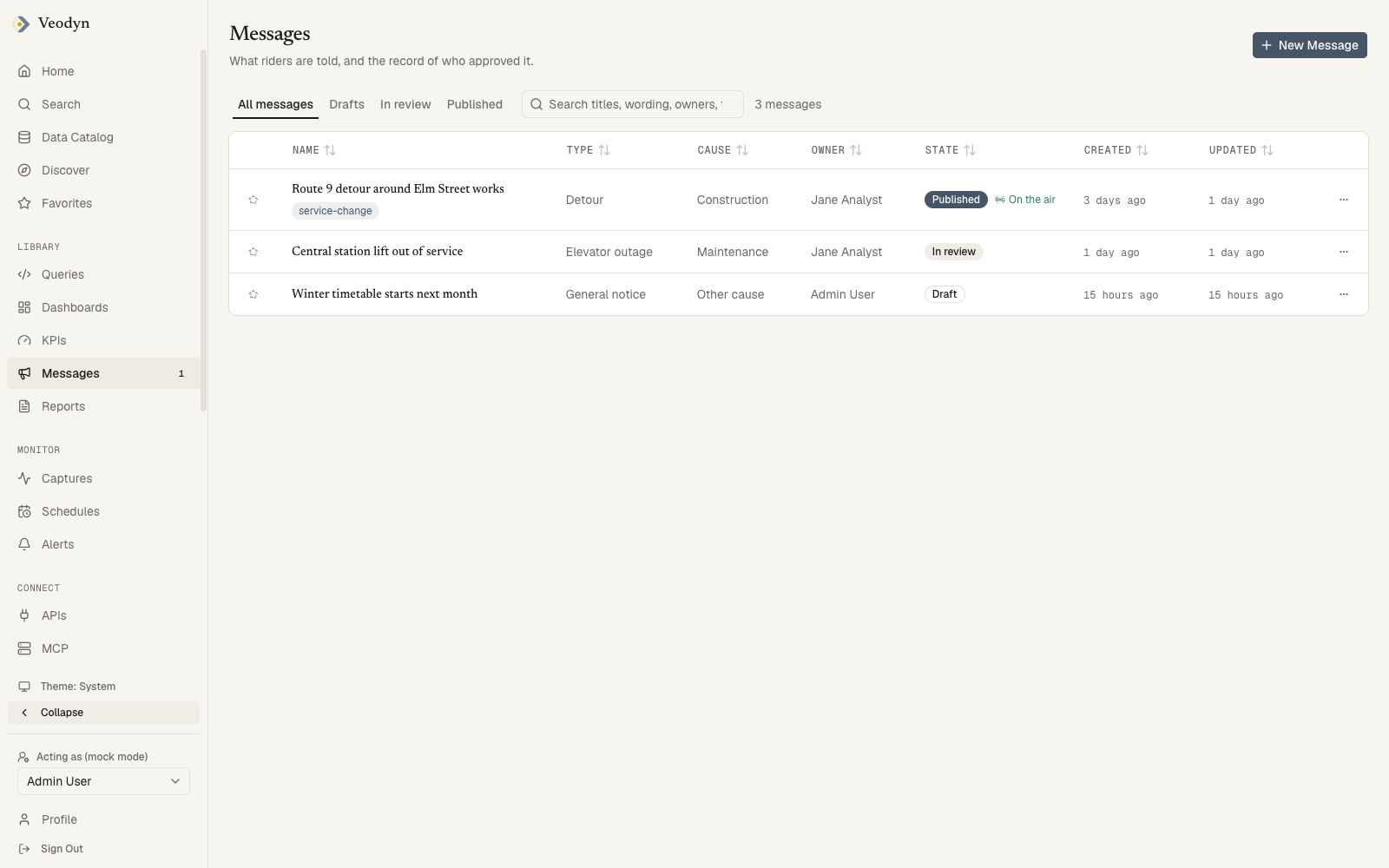
Four scope tabs sit above the table: All messages, Drafts, In review and Published. Published also lists messages that were later unpublished, because they were on the air once and the record stays. Search matches titles, wording, owners, tags and the routes and stops a message names.
| Column | Holds |
|---|---|
| Name | The library title, with tags underneath |
| Type | Detour, Delay, Planned work, Elevator outage, Escalator outage, Emergency or General notice |
| Cause | The GTFS cause, Construction, Maintenance and so on |
| Owner | Who created it |
| State | Draft, In review, Published or Unpublished, plus On the air while an active period is running |
The Messages row in the sidebar carries a count of messages waiting for your review, and Home lists them under Waiting for your review.
Writing one
New Message opens the composer at /messages/new. It is one text box, with the rest arranged around it.
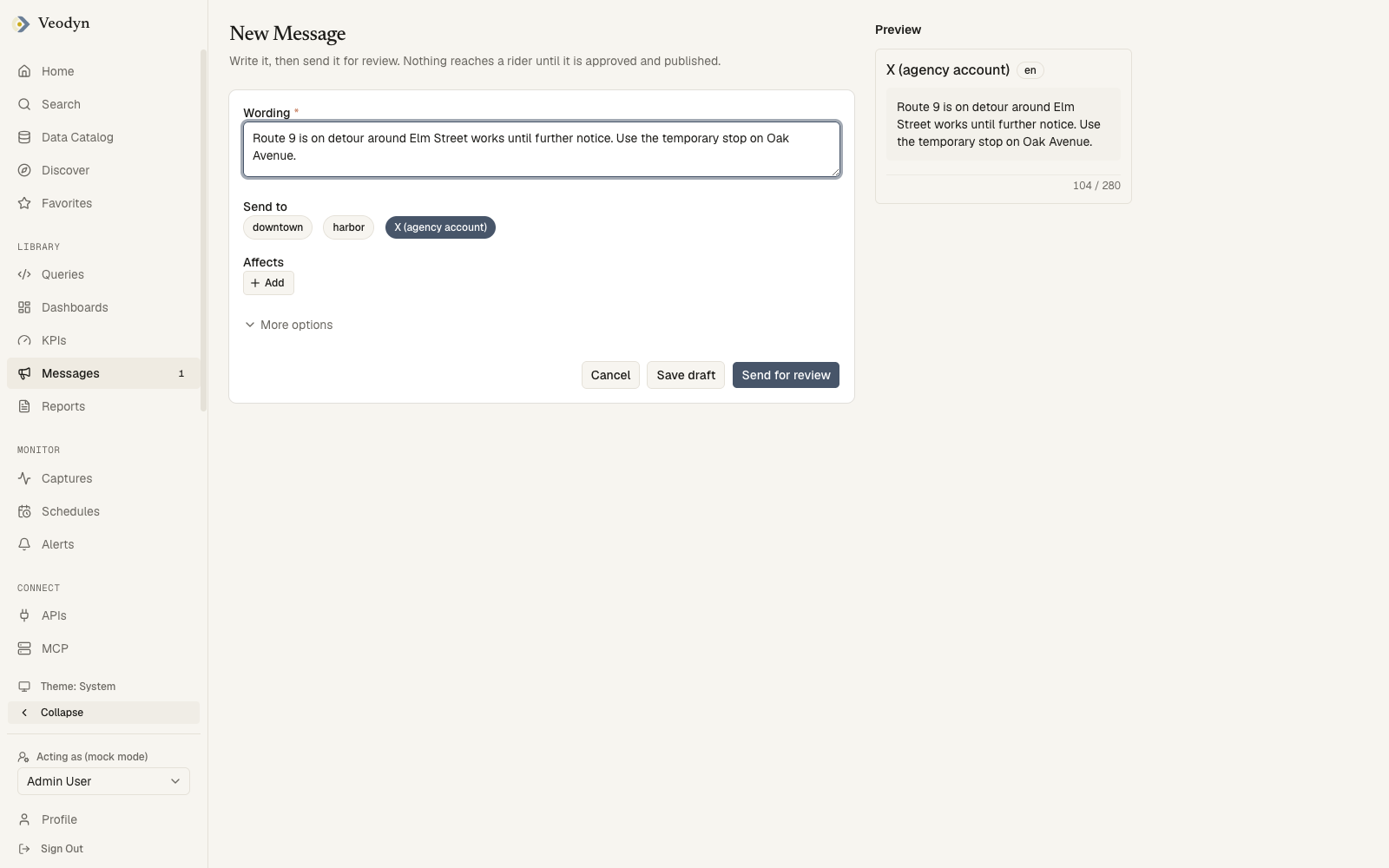
Wording is what riders read. For a channel that separates a header from a description, such as an alert feed, the first line is the header and the rest is the description, and the preview shows the split. A connector that takes plain text gets the box whole.
Send to is one pill per channel, and every channel that is switched on starts selected. A message goes into at most one alert feed, because the routes and stops it names only mean something inside the dataset that feed is built on. Pick a route from one feed and the other feeds lock, with the reason on hover. A connector has no such limit. A channel an administrator has switched off still shows, with a "switched off" caption, and can be selected, since it may be switched back on before the message is published.
Affects names the routes, stops or trips the message is about. Add opens a search across every alert feed's dataset, grouped by feed; Whole agency is the first result when the box is empty. An alert feed refuses a message that names nothing, so the row is required once a feed is in Send to. A message going only to connectors can leave it empty.
Until appears once an alert feed is in Send to, with two choices: Further notice, or A time with one end. The start is now. A connector posts once when the message is published, and the end does not take the post down again, so the row stays hidden for a connector-only message and the preview card says so instead.
More options is closed by default and never changes what would be sent. It holds separate Header and Description boxes, the situation type with GTFS severity, cause and effect, translations, wording for a particular connector, extra active periods, and the title shown in the library. A stored message whose header is not the first line of its description opens with it expanded, so nothing is hidden.
Preview on the right is one card per channel in Send to, showing the exact text that channel would receive and the count against its cap. A channel that would refuse the message says why inside its card, and Send for review stays off until every card is clean. Save draft needs only a non-empty box.
Review and publishing
A message moves through four states, and the header of its page offers only the actions that apply.
| State | Actions |
|---|---|
| Draft | Edit, Send for review, Delete |
| In review | Approve, then Publish; or Reject |
| Published | Correct, Unpublish |
| Unpublished | Edit, Send for review |
Approve, Reject, Publish, Unpublish and Resend need the publish_message permission, or an administrator. Reject asks for a note and returns the message to draft.
The four-eyes rule that governs reports applies here too, through the same reports.require_separate_approver setting: the person who sent a message for review cannot approve it. A message drafted by an alert or KPI needs a separate approver whatever the setting says, since the author was a machine.
A message that changes after approval loses that approval and goes back for review. Publishing sends it to every channel in Send to in one go.
The message page
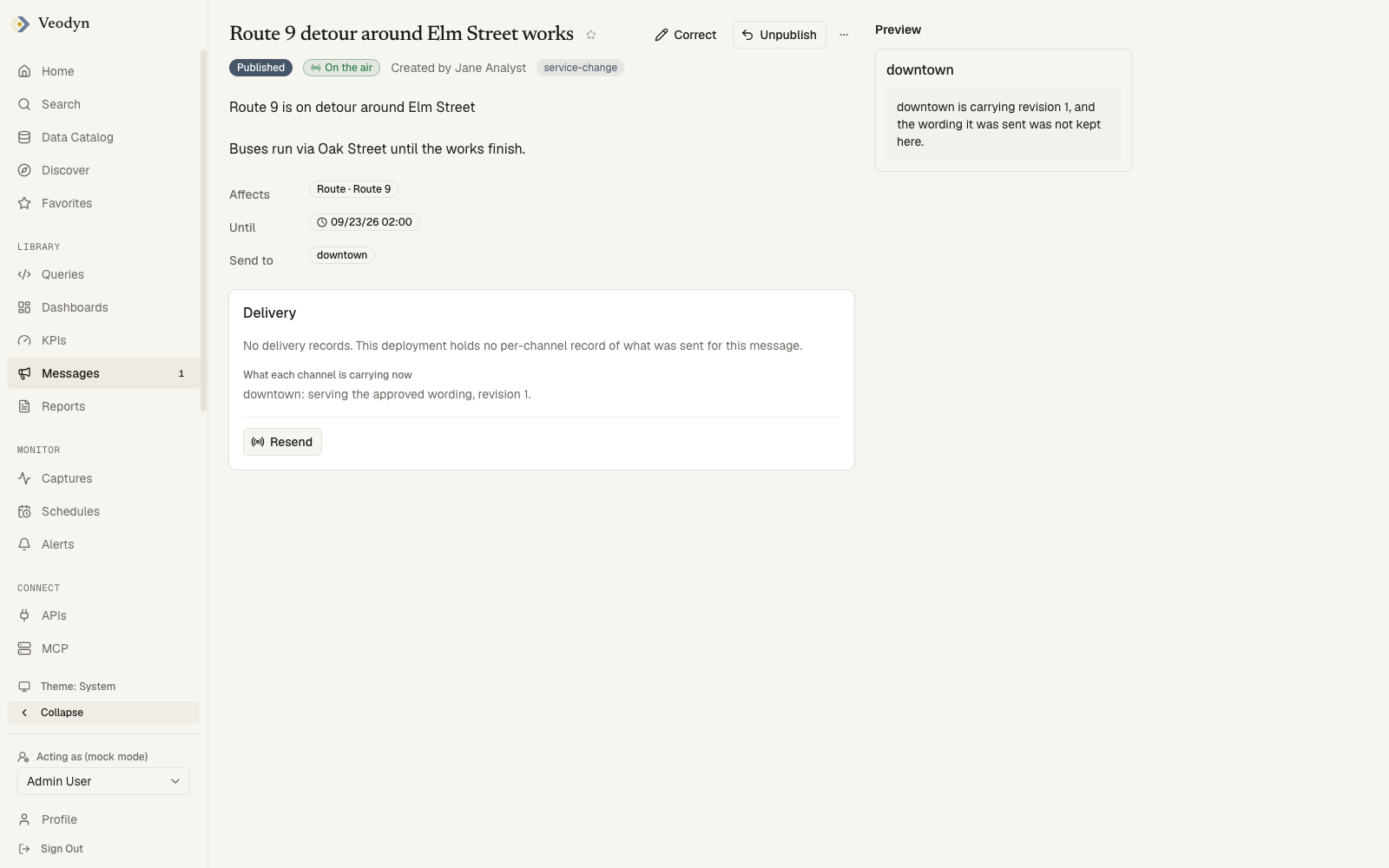
The wording as written, then Affects, Until and Send to as read-only chips. Delivery appears once a message has been published: one row per channel with its outcome, the time, and where the connector returns one, a link to the post.
| Outcome | Meaning |
|---|---|
| Queued | Handed to the channel, not yet confirmed |
| Delivered | The channel took it; a feed shows when it has been in the feed since |
| Failed | The channel refused or did not answer, with a Retry beside it |
| Withdrawn | The active period ended and the feed no longer carries it |
| Superseded | A later revision replaced this one on the channel |
Resend at the foot of the section hands the approved revision to any channel in Send to that has not been handed it yet, such as one switched on after publishing. It does not touch a channel that already took the message, and it does not retry a failed one: that is what the row's Retry is for, and Resend refuses when every channel has already been sent or queued.
Correct on a published message opens the composer on a copy. The original stays on the air until the correction is approved, and the preview shows both, labelled Carrying and Proposed. A feed takes the correction in place. A connector cannot take back a post, so a correction there goes out as a follow-up, and the connector's page says which of the two it does.
Unpublish withdraws the message from every feed it is in and rebuilds them. The dialog names what stops being served before you confirm.
From an alert or KPI
An alert or a KPI can draft a rider message on its own each time it fires. The Rider message card on the alert or KPI page holds the switch, Draft a rider message when this fires, and the three things a draft is built from.
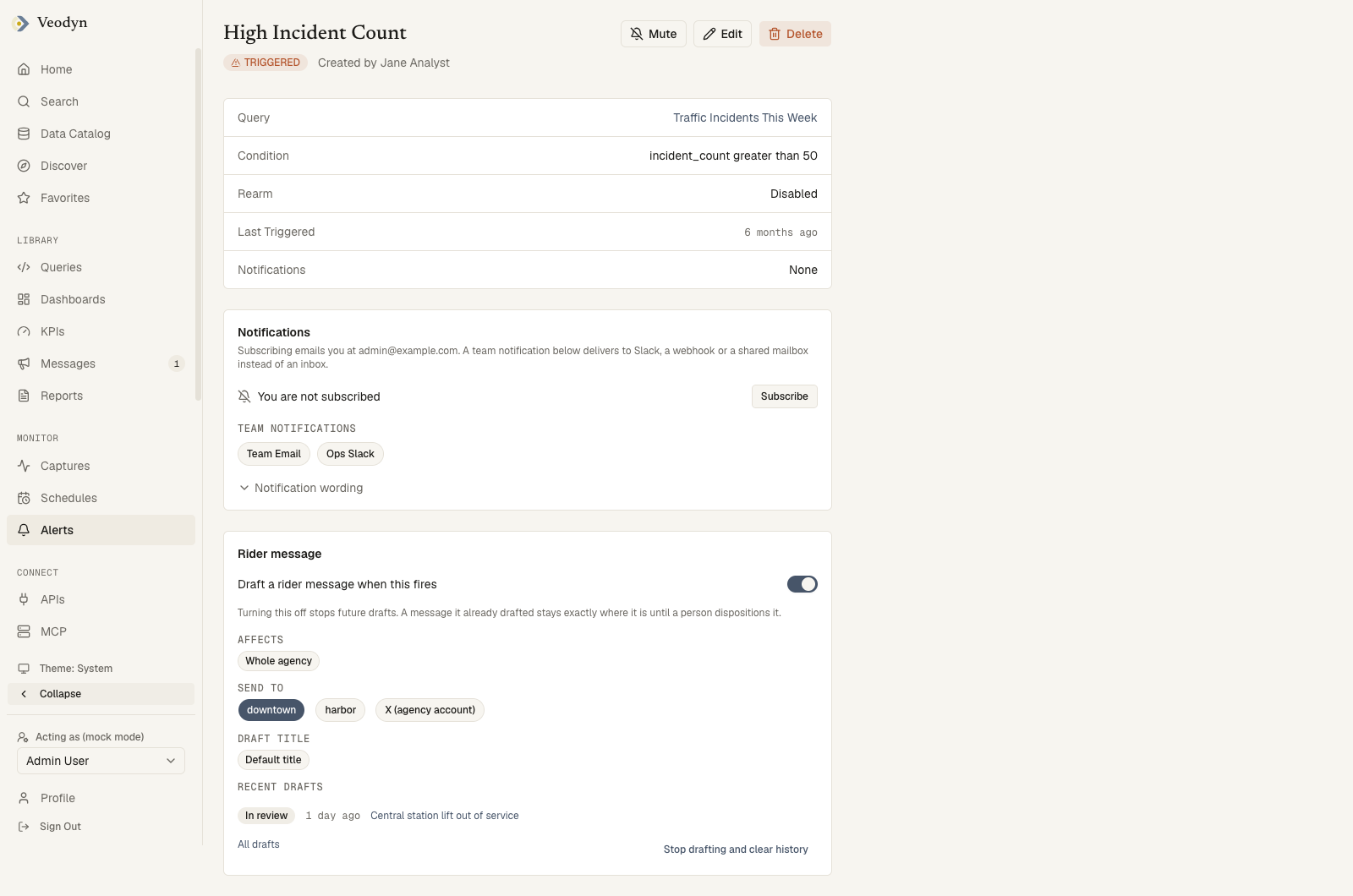
- Affects is the rule for what each draft names: the whole agency, or a route, stop or trip read from a column of the alert's result, such as
route_id. Switching the card on infers this from the result's columns. Click the chip to change it; the editor asks one question and saves only on Save. With no alert feed under Send to, the editor asks nothing, since a connector needs no entity. - Send to is the same pills as the composer. Ticking a different alert feed moves the rule to that feed's dataset.
- Draft title is the library title each draft gets, the alert's name unless you change it.
- Recent drafts lists the last five, each a link to the message, with All drafts opening the list filtered to this trigger.
A draft lands in review and stays there until a person approves or rejects it, like any other message. On a KPI, switching the card on arms the KPI's alert first, since there is no breach to answer without one.
Stop drafting and clear history deletes the rule and its firing record. The drafts it already wrote stay as messages.
Where a message can go
Every channel a message can name is listed on the Channels page, and that is also where an administrator switches one off or configures a connector's credentials. See Channels.